PyWBT: Python Wrapper for WhiteboxTools#







Overview#
PyWBT is a Python wrapper for the WhiteboxTools (WBT) geospatial analysis library. It simplifies geospatial workflows by providing an easy-to-use Pythonic interface while maintaining a minimal dependency footprint—relying only on Python's built-in modules.
You can try PyWBT directly in your browser by clicking the Binder badge above.
Key Features#
- Lightweight Python interface for WBT’s command-line tools.
- Seamless integration with WBT for custom geospatial workflows.
- Minimal dependencies for ease of installation.
- Optional
dem_utilsmodule for obtaining and preprocessing DEM data from 3DEP (US only at any resolutions) and NASADEM (global coverage at 30 m resolution).
Installation#
Install PyWBT via pip or micromamba:
Using pip:
Using micromamba (or conda/mamba):
Quick Start#
PyWBT enables the execution of WBT tools with the whitebox_tools function, which
manages the environment setup, including downloading the WBT executable for your
operating system.
Basic Usage#
The whitebox_tools function requires two key arguments:
src_dir: Directory containing the input files.arg_dict: Dictionary where tool names are keys and argument lists are values.
Example usage:
import pywbt
from pathlib import Path

src_dir = Path("path/to/input_files/")
wbt_args = {
    "BreachDepressions": ["-i=dem.tif", "--fill_pits", "-o=dem_corr.tif"],
    # Additional tools...
}

pywbt.whitebox_tools(src_dir, wbt_args)
For more detailed workflows and usage patterns, refer to the documentation.
Managing Output Files#
To manage the output, specify which intermediate files to keep using the files_to_save
argument. Only those files listed will be saved, and the rest will be deleted. By
default, all files are stored in save_dir (the current working directory, by default).
Tool Lookup#
Use list_tools and tool_parameters to explore available tools and their arguments.
Here's an example using pandas for querying tools:
import pandas as pd

tools = pd.Series(pywbt.list_tools())
tools[tools.str.contains("depression", case=False)]
Get parameters for a specific tool:
DEM Utilities#
The dem_utils module supports downloading and reading DEM data from 3DEP and NASADEM.
Install optional dependencies for DEM utilities:
Or using micromamba:
micromamba install -c conda-forge pywbt geopandas seamless-3dep planetary-computer pystac-client rioxarray
Example Workflow#
We can delineate the stream network and calculate the Strahler stream order for a region in London using PyWBT, as shown below:
import pywbt
from pathlib import Path

bbox = (0.0337, 51.5477, 0.1154, 51.6155)
src_dir = Path("path/to/input_files/")
pywbt.dem_utils.get_nasadem(bbox, src_dir / "dem.tif", to_utm=True)
wbt_args = {
    "BreachDepressions": ["-i=dem.tif", "--fill_pits", "-o=dem_corr.tif"],
    "D8Pointer": ["-i=dem_corr.tif", "-o=fdir.tif"],
    "D8FlowAccumulation": ["-i=fdir.tif", "--pntr", "-o=d8accum.tif"],
    "ExtractStreams": [
        "--flow_accum=d8accum.tif",
        "--threshold=600.0",
        "-o=streams.tif",
    ],
    "StrahlerStreamOrder": [
        "--d8_pntr=fdir.tif",
        "--streams=streams.tif",
        "--zero_background",
        "-o=strahler.tif",
    ],
}
pywbt.whitebox_tools(src_dir, wbt_args)
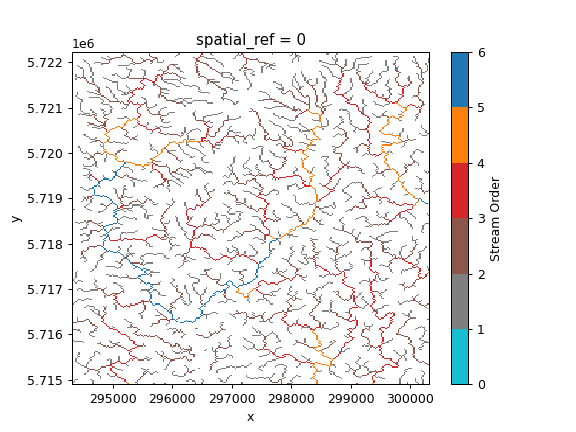
For more examples, visit the documentation.
Contributing#
We welcome contributions! For guidelines, please refer to the CONTRIBUTING.md and CODE_OF_CONDUCT.md.
License#
PyWBT is licensed under the MIT License. See the LICENSE file for details.